Cake Designer: Visual Cake Building for Professional Bakers
Designing cakes for clients is both an art and a business challenge. You need to capture their vision, translate it into a buildable design, calculate accurate pricing, and present it professionally. Most bakers juggle sketches, spreadsheets, and mental calculations.
Cake Designer in PlannerDay brings the entire process into one visual, interactive workspace.
The Challenge of Cake Design Consultations
Every baker knows the consultation struggle:
- Clients describe what they want but cannot visualise it
- You sketch ideas on paper that get lost or misinterpreted
- Pricing calculations happen separately from the design
- Changing one element means recalculating everything
- Small bakes like cupcakes and cake pops need separate tracking
- Proposals end up as awkward Word documents
Cake Designer solves these problems with an integrated visual approach.
Feature 1: Interactive Cake Builder
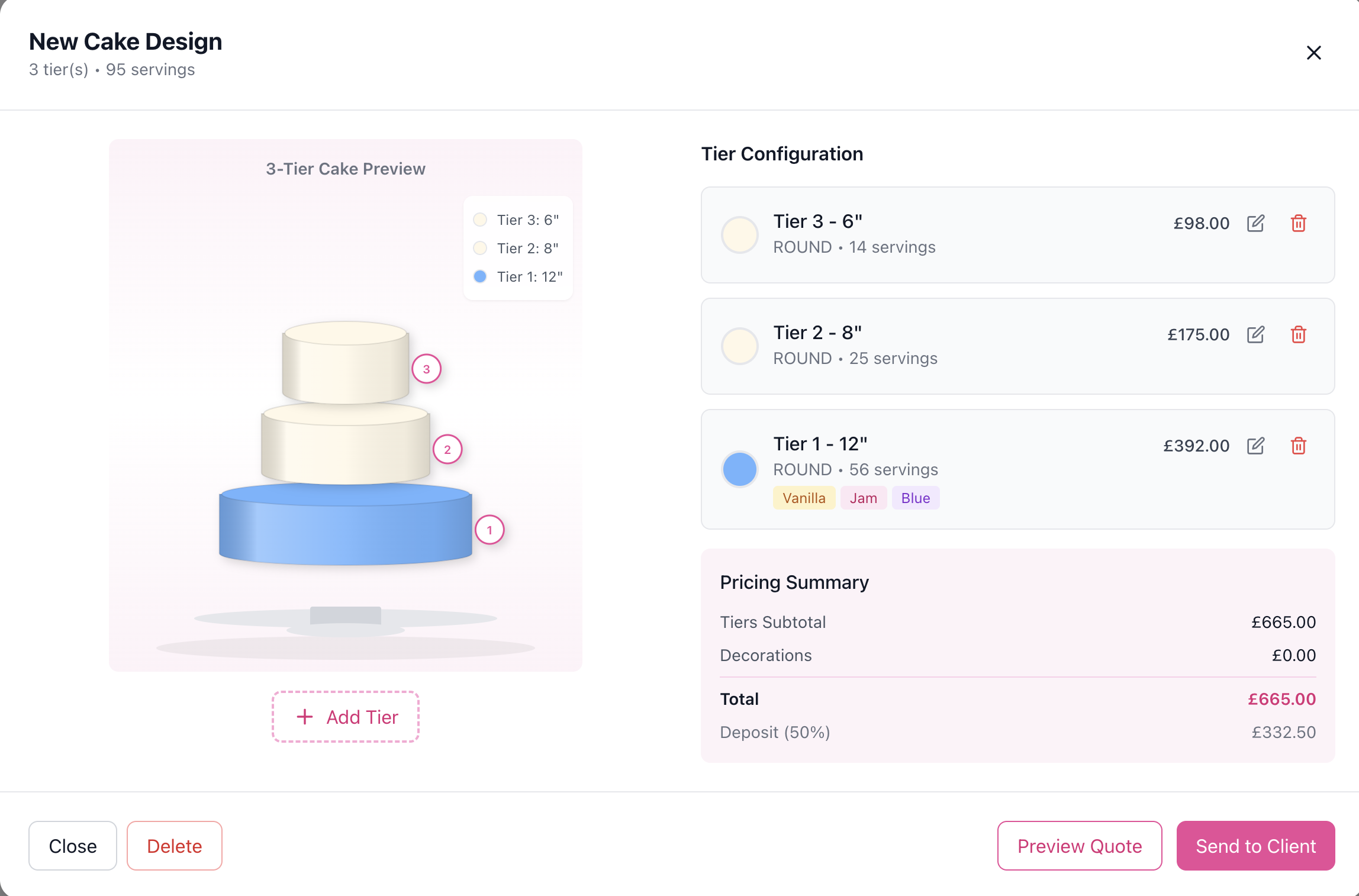
The heart of Cake Designer is an interactive visual builder that lets you and your clients see the cake take shape in real-time.
Building Tiers Visually
Add tiers to your cake and watch it build on screen:
- Select tier size from 4" to 18" diameter
- Choose shape (round, square, hexagon, heart, petal)
- Set height for each tier
- Layer flavours, fillings, and frostings
- Add colours that display on the visual preview
As you add each tier, the cake stacks up on screen. Clients can see exactly what their wedding cake will look like before you bake a single layer.
Tier Sizes and Servings
Each tier size includes automatic serving calculations:
| Size | Approximate Servings |
|---|---|
| 4" | 6 servings |
| 6" | 12 servings |
| 8" | 24 servings |
| 10" | 38 servings |
| 12" | 56 servings |
| 14" | 78 servings |
| 16" | 100 servings |
| 18" | 125 servings |
When clients say "we have 150 guests," you can immediately show them which tier combination hits that number.
Portion Types
Different events have different portion expectations:
- Wedding portions (smaller, more delicate)
- Dessert portions (larger, standalone dessert)
- Party portions (generous slices)
- Tasting portions (small samples)
The serving calculator adjusts based on portion type.
Real-Time Serving Counter
As you build the cake, a running total shows current servings. No more mental maths trying to work out if your design feeds enough guests.
Feature 2: Flavour, Filling, and Frosting Management
Your flavour library is what makes your cakes unique. Cake Designer lets you build a comprehensive library of options.
Flavour Catalogue
Create your signature flavours:
- Flavour name (e.g., "Madagascar Vanilla Bean")
- Description for client menus
- Category (classic, fruit, chocolate, specialty)
- Colour representation for visual builder
- Texture pattern for realistic preview
- Price per serving for automatic calculations
- Allergens for dietary requirements
- Dietary tags (vegan, gluten-free, nut-free)
- Signature flag to highlight house specialties
Filling Options
Fillings add complexity and flavour:
- Filling name (e.g., "Fresh Strawberry Compote")
- Pairing notes for flavour recommendations
- Colour for visual display between layers
- Pricing separate from cake flavour
Frosting Types
Track your frosting offerings:
- Frosting name (buttercream, fondant, ganache, cream cheese)
- Finish type (smooth, textured, semi-naked, naked)
- Category (American, Swiss, Italian meringue)
- Pricing for each frosting type
Colour Customisation
Each tier can have custom frosting and accent colours. The visual preview updates to show the colour palette, helping clients see how their wedding colours translate to cake.
Feature 3: Decoration Library
Cake decorations transform a simple stack of tiers into a showpiece. Manage your decoration capabilities and pricing.
Decoration Categories
Organise decorations by type:
- Sugar flowers (handmade edible flowers)
- Fresh flowers (florals added at delivery)
- Cake toppers (custom or provided)
- Edible prints (photos, logos, patterns)
- Gold/metallic elements (leaf, paint, luster)
- Textured finishes (ruffles, quilting, brush strokes)
- Structural elements (acrylic tiers, separators)
Decoration Pricing
Set pricing that reflects your skill:
- Price per unit for countable items (e.g., per sugar flower)
- Price per cake for overall treatments (e.g., gold leaf accents)
- Complexity level (simple, moderate, intricate, masterpiece)
Adding Decorations to Designs
When building a cake design, add decorations with:
- Quantity of each element
- Placement notes (base of tier 2, cascading down)
- Custom colour if different from standard
The total decoration cost calculates automatically.
Feature 4: Automatic Pricing
Pricing cakes accurately is essential for profitability. Manual calculations are slow and error-prone. Cake Designer calculates everything automatically.
Pricing Components
Your cake price builds from:
- Tier pricing (based on size, servings, flavour, filling, frosting)
- Decoration pricing (sum of all decoration costs)
- Delivery fee (if applicable)
- Setup charge (for on-site assembly)
- Rush fees (for short-notice orders)
Real-Time Totals
As you build the design, pricing updates live:
- Subtotal: Tiers (all tier costs)
- Subtotal: Decorations (all decoration costs)
- Delivery & Setup (service charges)
- Grand Total (final price to quote)
No more finishing a design and then spending ten minutes with a calculator.
Deposit Calculation
Set your deposit requirements (e.g., 50%) and the system calculates the deposit amount automatically. Include this on proposals.
Portion-Based Pricing
For clients with strict budgets, you can work backwards. Set a per-serving target price and see how different designs compare.
Feature 5: Small Bakes Designer
Wedding cakes are not the only product in your bakery. Many bakers offer cupcakes, cake pops, macarons, and other small bakes. These need their own design tool.
Product Types
Track all your small bake offerings:
| Product Type | Description |
|---|---|
| Cupcakes | Standard and mini cupcakes |
| Cake Pops | Spherical cake on sticks |
| Cookies | Decorated sugar cookies |
| Macarons | French sandwich cookies |
| Brownies | Sliced or individual portions |
| Mini Cakes | Individual-sized tiered cakes |
| Cake Jars | Layered cake in glass jars |
| Push Pops | Cake layers in push-up containers |
| Dessert Shooters | Small portions in shot glasses |
Small Bakes Design
Create small bakes orders with:
- Product type selection
- Total quantity
- Flavour assignments (e.g., 24 vanilla, 24 chocolate)
- Frosting colours (matching event palette)
- Display style (tower, platter, individual boxes)
- Per-unit and total pricing
Multi-Flavour Orders
Clients often want variety. Assign different quantities to different flavours within one order. The pricing calculates based on each flavour's cost.
Feature 6: Cake Design Status Workflow
Track every cake design from initial concept to delivery.
Design Statuses
| Status | Meaning |
|---|---|
| Draft | Initial concept, not yet shared |
| Pending Approval | Shared with client, awaiting response |
| Approved | Client confirmed design |
| In Production | Baking and decorating |
| Ready | Completed, awaiting delivery |
| Delivered | Cake delivered and setup complete |
Linking to Events
Connect cake designs to specific events. When viewing a wedding event, you see the associated cake design, its status, and delivery date.
Feature 7: Tasting Management
Many bakers offer tastings before clients commit to a design. Cake Designer helps manage this process.
Schedule Tastings
Book tasting appointments linked to:
- Client profile
- Date and time
- Flavours to sample
- Notes from the session
Tasting Follow-Up
After a tasting, update notes with client preferences. These preferences inform the final design and can be referenced during the design process.
Tasting Fees
Track whether tastings are complimentary or charged. Some bakers apply tasting fees to the final order.
Creating Professional Proposals
Once your design is complete, generate proposals that impress clients.
Proposal Contents
A cake design proposal includes:
- Visual preview of the cake design
- Tier breakdown with sizes, flavours, and colours
- Serving count and portion type
- Decoration list with all elements
- Itemised pricing showing where costs come from
- Total and deposit amounts
- Delivery and setup details
Branded Presentation
Proposals use your company branding for a professional look. Clients receive a polished document that reflects your business quality.
Real Workflow: Wedding Cake Consultation to Delivery
Here is how Cake Designer transforms your process:
1. Initial Enquiry
Client submits a cake enquiry. You see their event date, guest count, and initial ideas.
2. Consultation Preparation
Before the meeting, review their vision board or Pinterest references. Prepare flavour samples for their tasting.
3. Design Session
Open Cake Designer on your laptop or tablet. Build the cake together:
- Add tiers based on guest count
- Select flavours from your library
- Add fillings and frosting
- Apply decorations to match their theme
- Watch pricing update in real-time
The client sees their cake take shape. They can request changes and see the impact immediately.
4. Proposal Generation
Generate a proposal with the visual design, full details, and pricing. Send directly to their email.
5. Approval and Deposit
Client approves the design. Send a deposit invoice through PlannerDay. Mark the design as "Approved."
6. Production
As you bake and decorate, update the status. The design serves as your production brief.
7. Delivery
Deliver and setup the cake. Mark as "Delivered." The event record shows complete fulfilment.
Time and Revenue Impact
Bakers using Cake Designer report:
| Improvement | Impact |
|---|---|
| Consultation time | 40% faster with visual builder |
| Pricing accuracy | Eliminate calculation errors |
| Upselling | Easier to add "just one more tier" |
| Client satisfaction | Clients love seeing their design |
| Follow-up | Proposals sent same day, not days later |
When consultations are more efficient, you can handle more clients. When pricing is accurate, you protect your margins. When clients are excited, they order more.
Getting Started with Cake Designer
Cake Designer is available on Individual, Team, and Enterprise plans.
Setup Steps
- Build your flavour library – Add all cake flavours you offer
- Add fillings and frostings – Complete your option set
- Configure decorations – Add your decoration capabilities with pricing
- Set pricing defaults – Ensure per-serving prices are accurate
- Create your first design – Practice building before a client meeting
Ongoing Use
- Create designs during consultations
- Generate proposals immediately
- Track design status through production
- Link designs to events for complete records
Frequently Asked Questions
Can clients see the visual design online?
Proposals include the visual design as part of the document. You control when and how designs are shared.
How accurate are the serving calculations?
Serving counts use industry-standard calculations based on tier size and portion type. You can adjust if your cutting style differs.
Can I duplicate designs?
Yes, copy existing designs as starting points for new orders. Useful when clients want something similar to a previous cake.
Does it work for non-wedding cakes?
Absolutely. Birthday cakes, corporate events, anniversaries – any cake design works in the system.
How do I handle dietary restrictions?
Flavour and filling records include allergen and dietary tags. When building a design, you can filter to suitable options.
Conclusion
Cake Designer transforms how bakeries handle custom cake orders. The visual builder impresses clients and speeds up consultations. Automatic pricing eliminates errors and protects margins. Small bakes management expands your product offerings.
If you are a professional baker spending hours on sketches, calculations, and proposal documents, Cake Designer reclaims that time and elevates your client experience.
Design beautiful cakes and run a more profitable bakery.